
Drive Health Analyzer 2.5.170 Download for Windows is a computer application designed to assess the health status of storage devices like HDDs, SSDs, and NVMe drives. Drive Health Analyzer evaluates the current state of the drive with the use of information available through S.M.A.R.T technology (Self-Monitoring, Analysis, and Reporting Technology). Drive Health Analyzer helps to prevent any data losses that may happen because of failure of the storage device.
Compatibility with almost all disk drive types such as NVMe, SATA, and IDE is assured. Includes live notifications and comprehensive health information along with automatic monitoring. The graphical user interface provides important information regarding bad sectors, read/write failures, and life expectancy of the hard drive.
Features of Drive Health Analyzer
We will share some features for Hard drive health analyzer download
1. Drive Health Monitoring
Monitoring continuously the general health state of the storage drive and providing details on its present state.
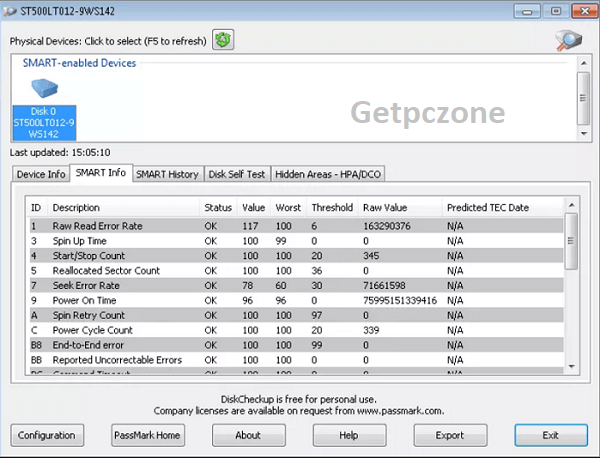
2. S.M.A.R.T. Attributes Analysis
Reading and analyzing the S.M.A.R.T. attributes of the storage drive in order to determine possible hardware problems or the imminent failure of the drive.
3. Drive Temperature Monitoring
Presenting the present temperature state of the storage drive in order to protect it from overheating.
4. Drive Performance Monitoring
Monitoring the performance of the drive in order to track possible unusual decrease in its performance.
5. Drive Failure Warning
Providing early warning to the user in case of detection of possible hardware problems in order to allow backing up of the data in advance.
6. Important Drive Parameters
Presenting the user with the parameters of the drive, such as its name, capacity, firmware version, serial number and interface type.
7. Intuitive Interface
Providing a user-friendly interface that allows monitoring the drive easily.
What is Drive Health Analyzer Free Download for Windows Used For?
The typical uses of Drive Health Analyzer include:
- To check the health status of HDD, SSD, and NVMe drives.
- To identify any possible hardware failures that may occur.
- For early prediction of drive failure and preventing data loss.
- Monitoring the drive temperature and performance.
- For determining the status of the storage device during maintenance work.
Advantages of Drive Health Analyzer
- Helps avoid any unforeseen disk malfunctions.
- Helps safeguard data by offering early alerts.
- Simple to use, offering health reports.
- Suitable for different kinds of disks.
- Increases reliability of the system through constant monitoring.
Conclusion
Download Drive Health Analyzer for 32-64 bit is an effective tool that helps monitor the condition and work of storage drives. This is achieved by analyzing the S.M.A.R.T data, monitoring the temperature, and giving out notifications on the possible problems with storage drives. The software can be used by both home users and business people to keep their storage devices healthy.

Drive Health Analyzer is a comprehensive disk monitoring solution designed to prevent data loss by tracking the health status of SSDs and HDDs.
- Developer :
- Version :
- Language :English
- Update :
- License :
- Systems :
- Downloads :
- Vote Software :(0 votes, Average: 0)
- Compatibility :Windows 10 / Windows 11 / Windows 7