AnkhTech Windows Boot 2026 Download for Windows is a custom, enhanced boot environment based on Microsoft’s Windows Preinstallation Environment (WinPE) designed to replace the standard Windows installer screen with a full-featured, Windows-like interface.
What is AnkhTech Windows Boot?
Instead of the minimal blue setup screen you normally see when installing Windows, this tool boots you into a desktop-style environment complete with a Start menu and File Explorer, making it far easier to navigate, manage files, and run maintenance tasks before or during a Windows installation.
At its core, AnkhTech Windows Boot serves as a multifunctional bootable ISO that technicians and advanced users can use to install or repair versions of Microsoft Windows — including Windows 7, 8, 10, and 11 — on PCs and laptops of varying hardware configurations. It’s especially useful when preparing installation media on a USB drive using tools like Rufus. Once you boot from the USB, instead of launching only the installer, you’re dropped into a working environment that behaves much like a lightweight Windows session.
A key advantage of this environment is its expanded functionality. Alongside its familiar interface, it includes a set of preloaded utilities accessed through the Start menu, enabling disk management, file backups and restores, partitioning, hardware testing, and other maintenance operations before Windows is installed. This blend of tools helps users solve common pre-install issues — such as repairing corrupted partitions or recovering files — without needing to launch separate external software.
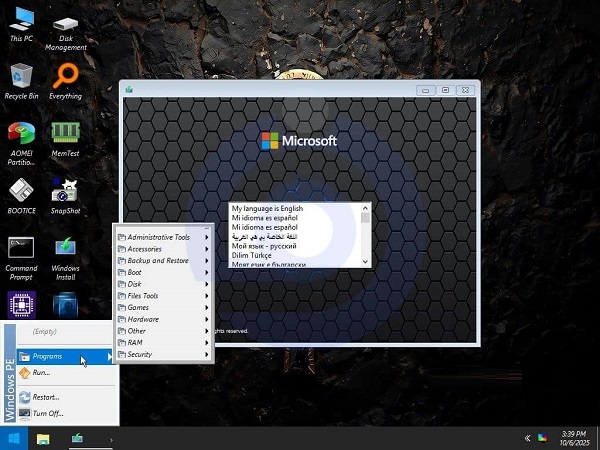
AnkhTech Windows Boot is offered in multiple editions tailored to different hardware capabilities. Standard builds include a comprehensive suite of professional tools for modern systems, while “Lite” and “SuperLite” variants offer progressively smaller toolsets optimized for older or lower-resource machines. This allows flexibility in choosing a boot environment that balances performance with functionality for specific tasks.
Because it operates from WinPE, all tools and the desktop behave as though running from memory, meaning the system’s internal drives aren’t permanently altered until a user deliberately initiates an installation or disk change. However, it’s important to note that this is an unofficial tool created by Ankh Tech and is not affiliated with or endorsed by Microsoft — users should exercise caution and ensure any Windows installations use legitimate ISO files and valid licenses.
In summary, AnkhTech Windows Boot for Windows is a modified, feature-rich boot environment that turns the Windows installation process into a more user-friendly, interactive experience while providing built-in maintenance tools useful for troubleshooting and system preparation.
What is new in AnkhTech Windows Boot 2026:
Core Boot Environment
-
WinPE-based Interface: Boots into a full Windows-like desktop instead of the plain Windows setup screen, complete with Start menu and File Explorer.
-
Multiple ISO Variants: Three boot sizes/options (Standard, Lite, SuperLite) tailored for new, medium, and low-end hardware.
Installation & Compatibility
-
Universal Windows Installer: Can install various Windows versions (Windows 7, 8, 10, 11) from the same boot environment using an
install.wimorinstall.esd. -
No Strict Requirements: Designed to work on both older and newer PCs without strict hardware prerequisites.
Navigation & Tools
-
Familiar Desktop Experience: Includes a Start menu and file explorer for easy navigation before installation.
-
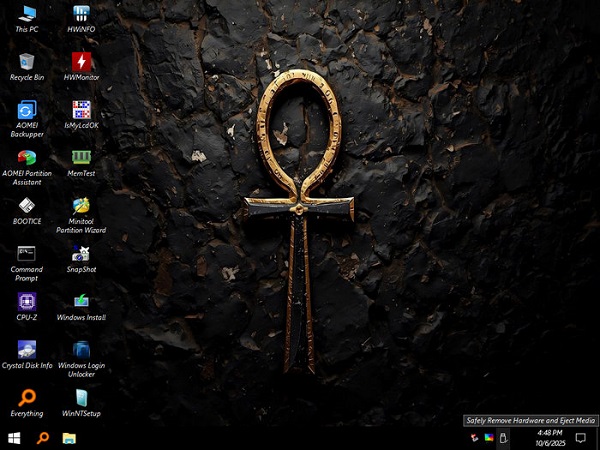
Professional Toolkit: Comes with built-in maintenance and utility programs for technician tasks such as disk management, backups, hardware tests, and file operations.
-
Integrated Utility Programs: Depending on the version, the boot environment may include common tools like partition managers, file archivers, system testers, and more.
Maintenance & Recovery
-
Disk Management: Tools for partitioning, formatting, and preparing disks before installation.
-
Backup & Restore: Backup utilities help save and restore data before carrying out system installs or maintenance.
-
File Operations: Allows moving, copying, and managing files — useful for salvaging data from broken systems.
Networking & Utilities
-
Network Access: Support for networking in WinPE means you can access shared resources or download tools during a maintenance session.
-
Enhanced Accessibility: Some WinPE variants include additional utilities and configurations (e.g., 3rd-party tools, search utilities).
Flexibility & Use Cases
-
Multi-Purpose Boot: Designed not just as an installer but as a full maintenance environment suitable for technicians and advanced users.
-
Ideal for Emergencies: Useful for diagnostics, data recovery, and repairing non-booting systems without accessing the main OS.

AnkhTech Windows Boot 2026 Download for Windows is a custom, enhanced boot environment based on Microsoft’s Windows Preinstallation Environment (WinPE) designed to replace the standard Windows installer screen with a full-featured, Windows-like interface. What is AnkhTech Windows Boot? Instead of the minimal blue setup screen you normally see when installing Windows, this tool boots you […]