EZ CD Audio Converter 12.4 Download (formerly Easy CD-DA Extractor) is a Windows-only multimedia tool that combines CD ripping, audio conversion, metadata editing, and disc burning into one application. It’s aimed at people who want quality audio file management without juggling several programs.
Review Of EZ CD Audio Converter 12.4
As you know, it is not possible to copy audio CDs directly to a computer or play them without the CD. To overcome this limitation, we must first convert them to appropriate audio formats using software so that we can transfer and copy them to the system so that they can be played on a computer or other players. copy them to the system so that they can be played on a computer or other players.
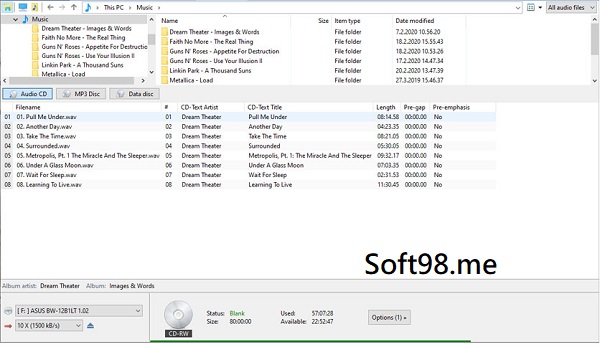
Features of EZ CD Audio Converter software:
- Burn audio, mp3, text and image files to disc.
- Ability to rip and encode high-quality audio CDs.
- Audio file converter for running on mobile and portable devices.
- Compress audio files to save disk space.
- Convert audio files from video files.
- Manage audio file metadata.
- Supports 3g2, 3ga, 3gp, aac, ac3, aif, aiff, ape, asf, au, avi, caf, cue, divx, dsf, dts, dtshd, dv, eac3, flac, flv, m2ts, m3u, m4a, m4b, mka, mkv, mov, mp1, mp2, mp3, mp4, mpc, mpeg, mpg, ogg, oma, omg, opus, ra, ram, rm, shn, spx, tak, tta, vob, w64, wav, webm, wma, wmv, wv.
👍 Pros (Strengths)
📀 Excellent Format Support
-
Handles dozens of audio formats — from common ones like MP3, FLAC, WAV, AAC to less typical ones like Opus and Monkey’s Audio.
-
You can convert between formats or rip CDs with high fidelity.
🏎️ Fast, High-Quality Conversions
-
Uses quality encoders (e.g., LAME for MP3) and gapless conversion, helping preserve sound quality and metadata like album art and tags.
🔁 Batch Processing & Metadata
-
Supports batch conversion of many files at once.
-
Strong metadata editing and online tag lookup improves library organization.
🧰 All-In-One Workflow
-
You can rip audio CDs, convert files, edit tags, create playlists, normalize volume, and burn discs all from one app.
👎 Cons (Limitations)
💰 Paid Software
-
Full functionality requires a license; there is a free trial but with limitations (e.g., time or feature restrictions).
📊 Mixed Ease-of-Use & UI
-
Some settings are advanced and can be confusing for beginners.
-
Interface could be more modern and better organized.
🐞 Occasional Bugs & Resource Usage
-
Some users report occasional crashes or bugs, especially with very large tasks.
-
It can be somewhat CPU-intensive, depending on settings and format.
❌ Not a Full DAW
-
While powerful for converting and ripping, it’s not a full audio editor (no multi-track editing or advanced effects).
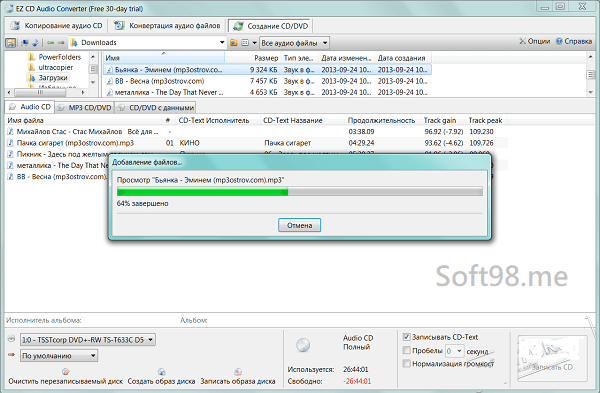
🧠 Who It’s Best For
Great choice if you want:
✔ Reliable CD ripping with strong format support
✔ High-quality audio conversions and tag editing
✔ A single application for multiple audio tasks
Not ideal if you want:
✖ A free tool (there are free alternatives like fre:ac or Exact Audio Copy)
✖ Advanced audio editing (like noise reduction, multi-track mixing)
✖ Mac or Linux support (Windows only).
⭐ Bottom Line
EZ CD Audio Converter is a powerful, versatile audio tool that excels at ripping and converting files with good quality and metadata support. It’s well-suited for audiophiles and advanced users, but beginners might face a learning curve, and some may find free alternatives sufficient depending on their needs. You May Also Search for CyberLink AudioDirector Ultra 2026 Download

EZ CD Audio Converter 12.4 Download (formerly Easy CD-DA Extractor) is a Windows-only multimedia tool that combines CD ripping, audio conversion, metadata editing, and disc burning into one application.
- Developer :
- Version :
- Language :English
- Update :
- License :
- Systems :
- Downloads :
- Vote Software :(0 votes, Average: 0)
- Compatibility :Windows 10 / Windows 11 / Windows 7 / Windows 8