McAfee VirusScan Offline Update Download typically updates virus definitions (DAT/SuperDAT files) automatically when your system is online. However, in air-gapped or offline environments, you can download the latest definition files on a machine with Internet access and then manually apply them to offline systems.
Review Of McAfee VirusScan Offline Update
-
McAfee releases standalone virus definition packages (often called SuperDAT or DAT files) that contain the current virus signatures.
-
These packages can be downloaded on an Internet-connected machine and then transferred (e.g., via USB) to offline machines.
-
You simply run the downloaded .EXE file on the target machine to update the virus definitions.
Features For McAfee VirusScan Offline
- Easy to set up.
- Small-sized setup.
- Portable anti-virus scanner.
- Handy in several circumstances.
- Freeware for individual and company usage.
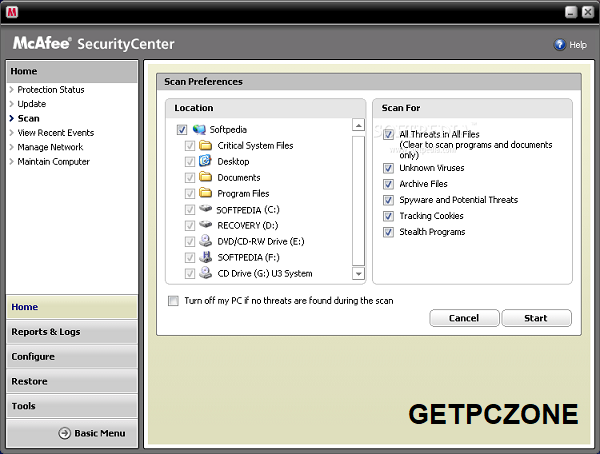
- 3 custom made scanning Modes
- Light body weight scanner will not hang the machine.
Where to download official updates:
🔹 Trellix/McAfee Security Updates page – McAfee/Trellix hosts downloadable content including DAT/engine updates on their Security Updates portal. Note: a valid support agreement (such as a subscription or corporate support contract) may be required to access some updates.
How to Do an Offline Update (Windows)
-
On an Internet-connected PC:
-
Visit the McAfee/Trellix Security Updates page (for your product name/version) to find the latest DAT/SuperDAT package.
-
Download the appropriate .EXE (or .ZIP) file containing the virus definitions.
-
-
Transfer the file to the offline computer (USB drive, shared network folder, etc.).
-
On the offline computer:
-
Double-click the downloaded .EXE file. This launches the installer wizard for the virus definitions.
-
Follow the prompts — it will replace the current DAT files with the latest ones.
-
-
Verify the update:
-
Open McAfee VirusScan and check the “About” or “Update Status” to confirm the new definitions are installed.
-
Tips & Notes
✅ One-off vs. Continual updates:
-
Offline updates are good for occasional manual updates. But they won’t automatically update again unless you repeat the download process. You May Also Search for Quick Heal Total Security / Antivirus 2026 Download Win 10, 7, 8
ersion compatibility:
-
Make sure the DAT/SuperDAT file you download matches the version of McAfee VirusScan installed. Using mismatched files can fail or cause errors.
Official access:
-
On McAfee/Trellix servers, many update files require you to log in with a valid subscription/support account before downloading.
Optional: Command-Line/Scripting (Advanced)
If you need to automate offline updates (e.g., for many machines):
-
McAfee SuperDAT installers typically support command-line switches like
/SILENTto run without user interaction. -
You can combine this with scripts to deploy updates across systems that are offline from the Internet but accessible on an internal network.

McAfee VirusScan Offline Update Download typically updates virus definitions (DAT/SuperDAT files) automatically when your system is online.
- Developer :
- Version :
- Language :English
- Update :
- License :
- Systems :
- Downloads :
- Vote Software :(0 votes, Average: 0)
- Compatibility :Windows 10 / Windows 11 / Windows 7 / Windows 8 / Windows 8.1