Grub2Win 3.0 Download for Windows 10/11 is a free, open-source boot manager for Windows that installs the powerful GNU GRUB 2 bootloader and lets you manage, customize, and select multiple operating systems from a graphical menu at system startup.
Review Of Grub2Win 3.0
It’s especially useful for users who want to dual-boot or multi-boot Windows with Linux and other environments without deeply modifying system files. Grub2Win is a Windows application that installs a GRUB2-based bootloader and provides a user-friendly configuration interface inside Windows, so you don’t need to hand-edit complex boot scripts manually. It supports both modern UEFI firmware and legacy BIOS systems, giving flexibility across a wide range of hardware.
Grub2Win for Windows is a robust, free, open-source boot manager that brings the flexibility of the GRUB2 bootloader to Windows users. With support for both UEFI and BIOS systems, a graphical configuration interface, customizable menu options, and tools for multi-boot setups, including direct ISO booting, it makes managing multiple operating systems simpler and more accessible for beginners and advanced users alike.

If a user is eager to try out a new operating system without committing to it completely, they can install it alongside their existing operating systems on their computer. That way, they don’t have to replace the one they’re currently using, and then have to reinstall the old one if they don’t see a good reason to keep the new one.
Features Of Grub2Win 3.0
Multi-OS Booting
-
Boot multiple operating systems such as Windows, Linux distributions, and other tools from a single, organized menu.
UEFI and BIOS Support
-
Works with both UEFI (GPT) and legacy BIOS (MBR) systems, letting you configure boot environments for older and newer PCs alike.
Graphical Boot Menu
-
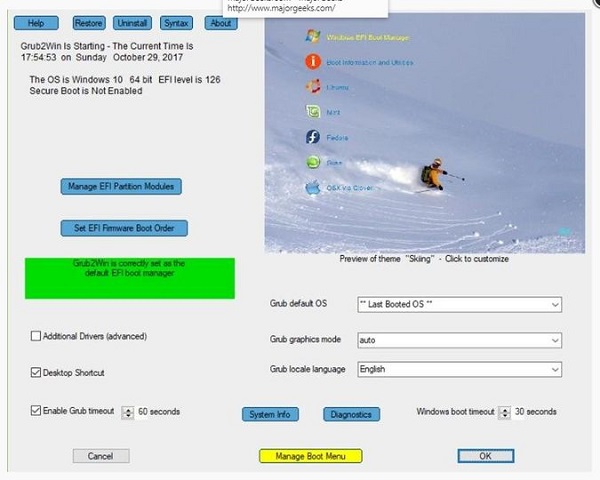
Provides a customizable, graphical boot selector where you can choose OS entries, set the default OS, and adjust the timeout and appearance.
Windows-Based Configuration
-
Manage all boot entries from a Windows GUI, so no need for command-line bootloader editing or Linux tools.
Boot from ISO and Tools
-
Supports booting ISO images and utility environments directly from your hard drive, including live Linux installers and diagnostic tools.
Customizable Appearance
-
Change backgrounds, fonts, colors, and menu layout to suit your preferences.
Safe Integration
-
Designed not to overwrite core Windows boot files like the Master Boot Record or EFI System Partition, minimizing system risk and making removal straightforward.
System Requirements:
Windows Versions: Windows 7 through Windows 11 are fully supported (both 32-bit and 64-bit). Limited legacy support is also available for Windows XP.

Grub2Win 3.0 Download for Windows 10/11 is a free, open-source boot manager for Windows that installs the powerful GNU GRUB 2 bootloader and lets you manage, customize, and select multiple operating systems from a graphical menu at system startup. Review Of Grub2Win 3.0 It’s especially useful for users who want to dual-boot or multi-boot Windows […]
- Developer :
- Version :
- Language :English
- Update :
- License :
- Systems :
- Downloads :
- Vote Software :(0 votes, Average: 0)
- Compatibility :Windows 11 / Windows 7 / Windows XP